
LinkedIn Post Date Extractor
Extract the exact date & time of any LinkedIn post in seconds. Paste URL → get precise timestamp. Free forever, no signup, no login required. Works instantly!
LinkedIn Post Date Extractor
Extract exact post dates from any LinkedIn URL instantly — No login, unlimited usage, 100% free
Works instantly • No signup required • 100% Client-side
Enter one URL per line • Maximum 50 URLs at once
How It Works
Extract LinkedIn post dates in 3 simple steps — no technical skills needed
Copy Post URL
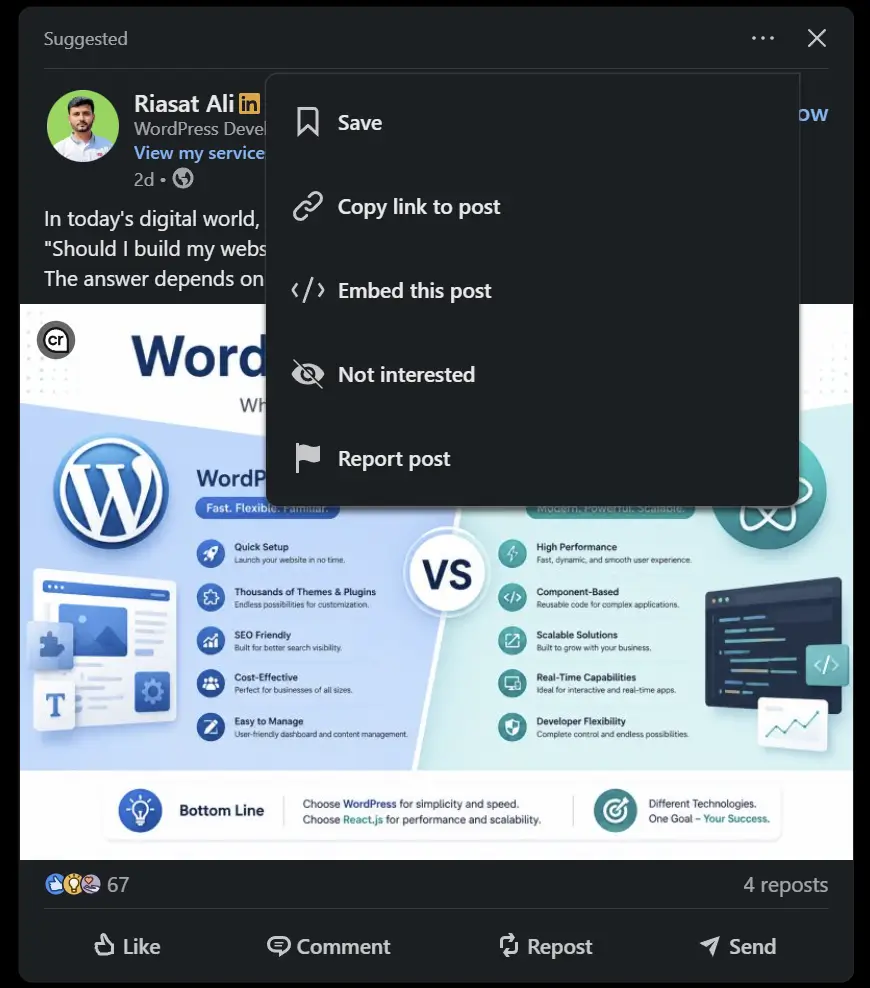
Open any LinkedIn post, click the three dots (•••) and select "Copy link to post"
Paste URL Here
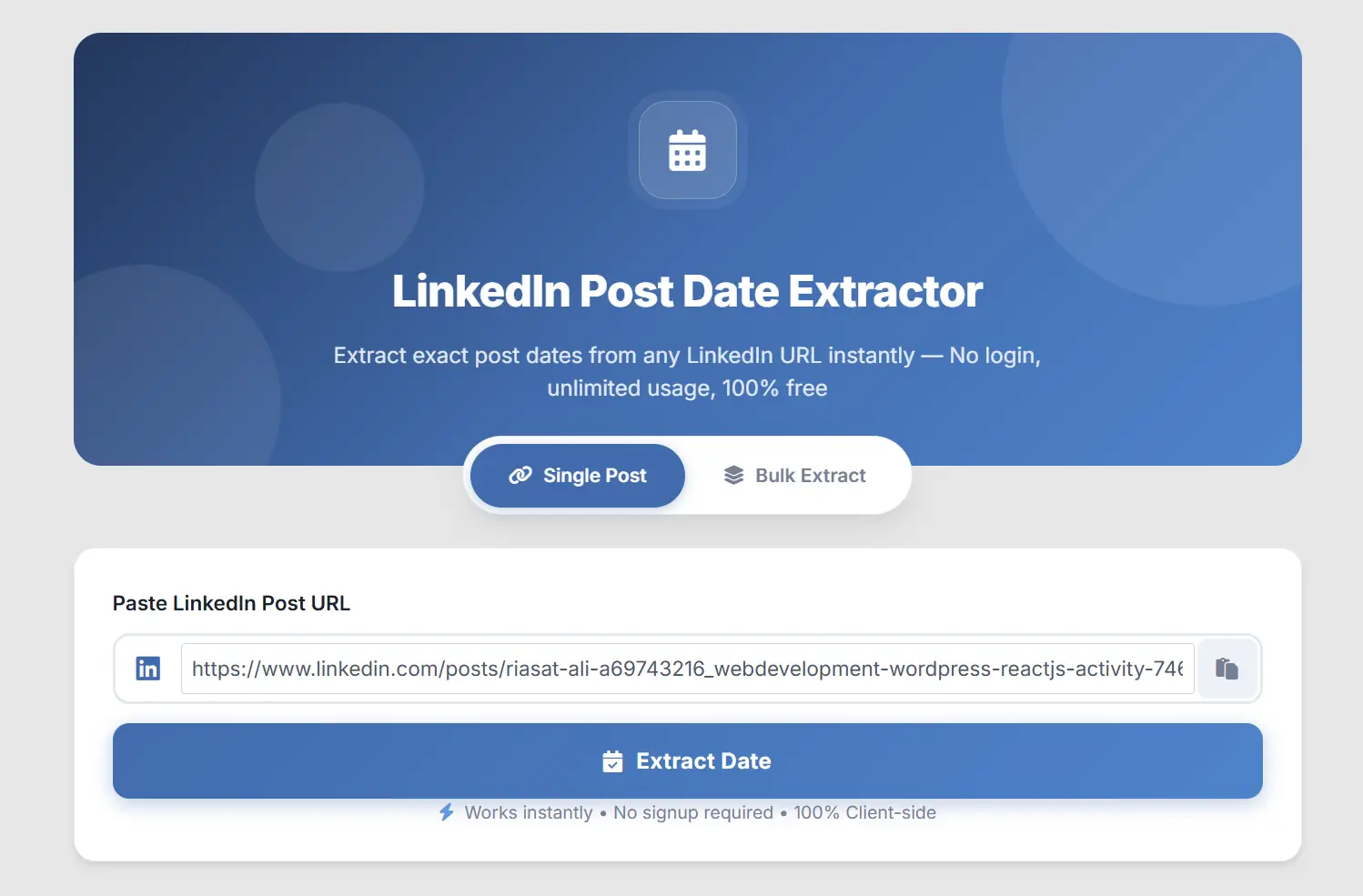
Paste the copied LinkedIn URL into the input field above or use the paste button
Get Exact Date
Click "Extract Date" and instantly see the exact date, time, and age of the post
Why Use Our Tool?
The fastest and most reliable LinkedIn date extraction tool available
Instant Results
Dates are extracted in under 1 millisecond. No waiting, no loading, no server requests.
100% Unlimited
No daily limits, no rate limiting, no blocks. Extract as many dates as you want, forever.
100% Private
All processing happens in your browser. No data is sent to any server. Zero tracking.
Bulk Processing
Extract dates from up to 50 LinkedIn posts at once with one-click CSV export.
Mobile Friendly
Works perfectly on phones, tablets, and desktops. Fully responsive design.
No Login Required
We never ask for your LinkedIn credentials. Just paste the URL and get the date.
Supported URL Formats
Our tool supports all standard LinkedIn post URL formats
linkedin.com/posts/username_activity-XXXXX-xxxx
linkedin.com/feed/update/urn:li:activity:XXXXX
linkedin.com/feed/update/urn:li:ugcPost:XXXXX
linkedin.com/feed/update/urn:li:share:XXXXX
Ever seen a LinkedIn post and wondered, “When was this actually posted?”
You’re not alone. LinkedIn makes it surprisingly hard to find the exact date of a post. All you see is “3w” or “2mo” but never the full date. No day. No month. No year. Nothing useful.
That’s exactly why we built this tool.
Our LinkedIn Post Date Extractor tells you the exact date, time, and day when any LinkedIn post was created. Just paste the URL. That’s it. You’ll have your answer in less than a second.
No sign-up. No login. No limits. And it works every single time.

Try our Related Tools: Linkedin Readability Checker
Why Can’t I Just See the Date on LinkedIn?
Good question. And honestly, it’s a bit frustrating.
LinkedIn only shows you vague timestamps like:
- “1d” (1 day ago)
- “3w” (3 weeks ago)
- “2mo” (2 months ago)
These are fine for casual scrolling. But if you’re doing any kind of research, content analysis, or competitor tracking, you need the real date.
Here are a few real examples where “2mo” just doesn’t cut it:
- You’re writing a blog post and want to cite a LinkedIn post with a proper date
- You’re tracking how often a competitor posts on LinkedIn
- You found an old post and need to know if the information is still relevant
- You’re building a content calendar based on past performance
- A recruiter sent you a job post and you want to check if it’s recent or outdated
Our tool solves all of these problems instantly.
How to Use This Tool (3 Easy Steps)
Using our LinkedIn Post Date Extractor is dead simple. Here’s how:
Step 1: Copy the LinkedIn Post URL
Open the LinkedIn post you want to check. Click on the three dots (•••) at the top right of the post. Then click “Copy link to post.”
If you’re on your phone, tap the share icon and choose “Copy link.”
Step 2: Paste the URL Here
Come back to this page. Click inside the input box and paste the URL you just copied. You can also tap the paste button (📋) next to the input field, it’ll paste automatically.
Step 3: Click “Extract Date”
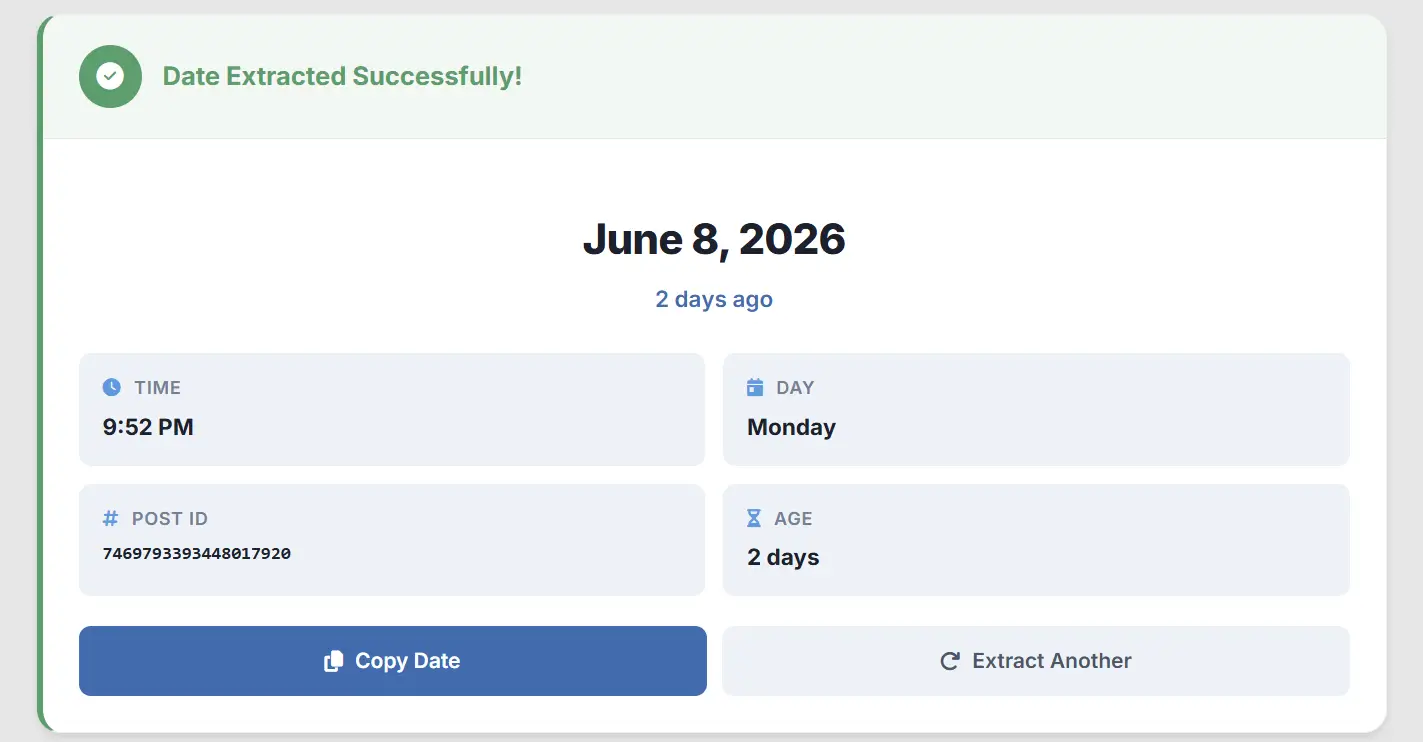
Hit the blue “Extract Date” button. Done. You’ll see:
- The full date (like “June 5, 2025”)
- The exact time
- The day of the week
- How old the post is (like “5 days ago” or “3 months, 12 days”)
Want to copy the date? Just click the “Copy Date” button. Easy.
Try our this tool: Linkedin Video Downloader
Need to Check Multiple Posts at Once?
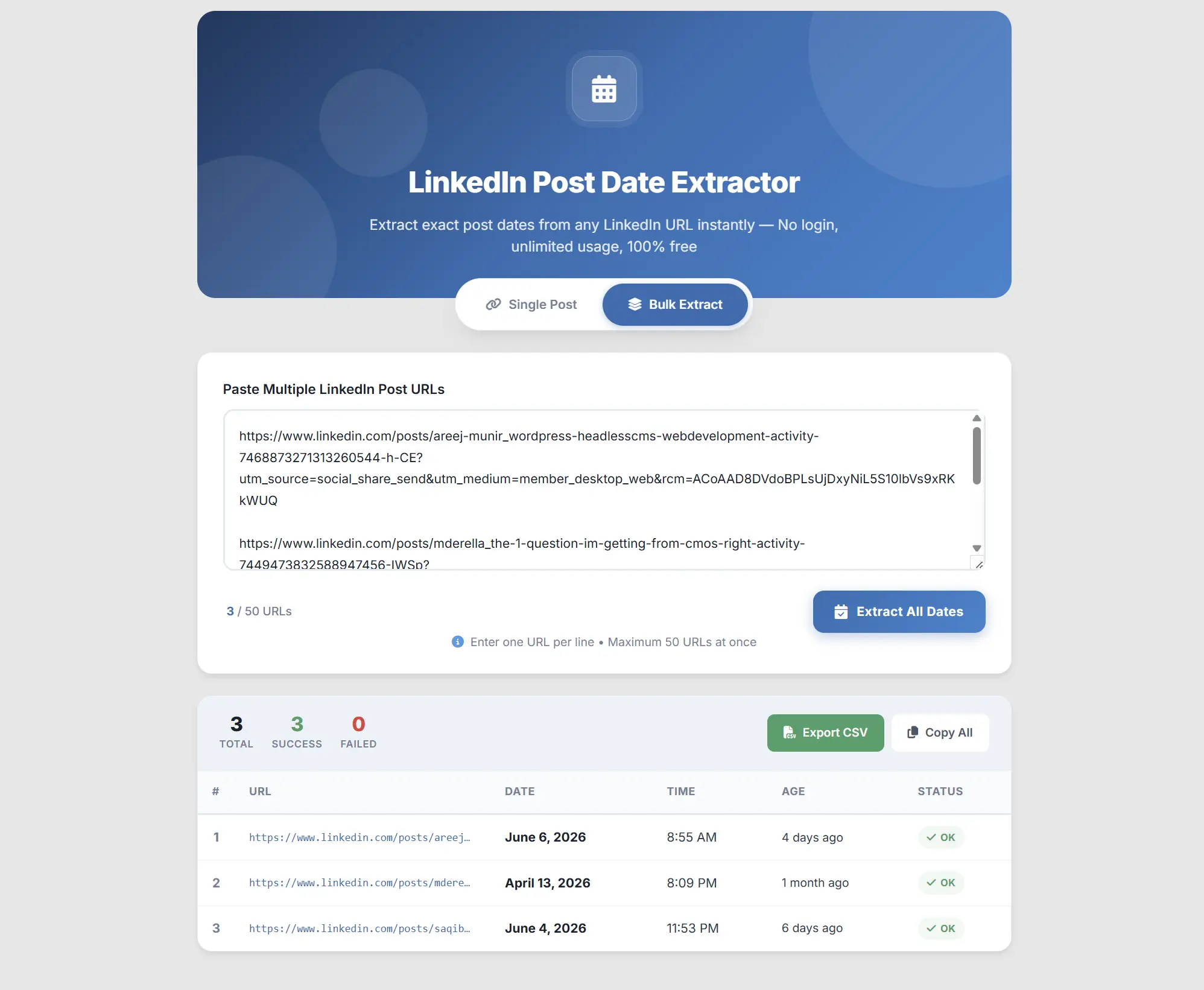
Switch to the “Bulk Extract” tab at the top. Paste up to 50 LinkedIn post URLs, one on each line. Click “Extract All Dates” and watch the magic happen.
You’ll get a clean table with every URL, its date, time, and age. And if you need the data for a spreadsheet, just click “Export CSV” to download everything as a file.
This is perfect for:
- Marketers analyzing competitor posting patterns
- Content managers tracking post schedules
- Social media teams auditing LinkedIn activity
- Researchers collecting data from multiple posts
How Does This Tool Work?
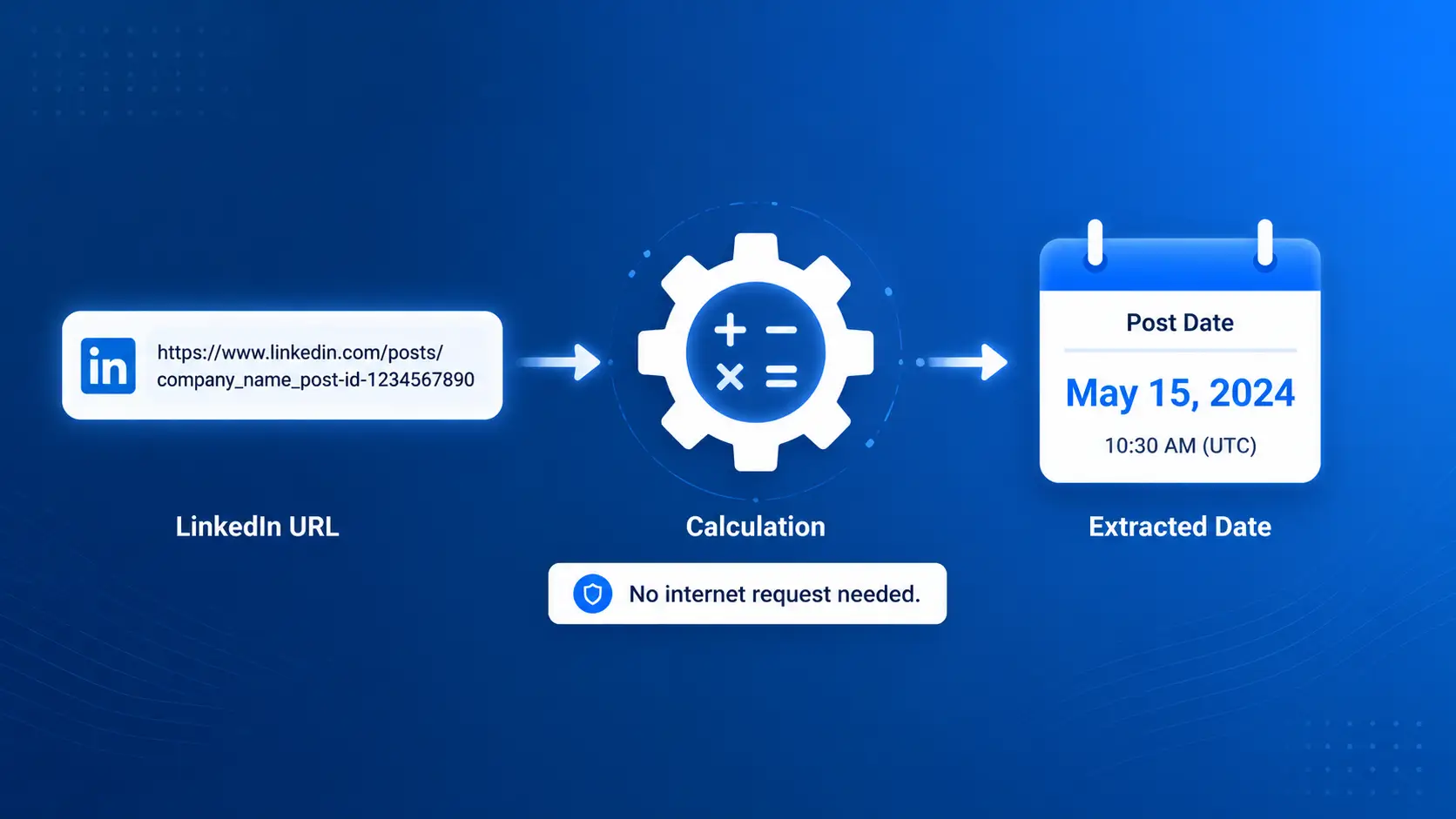
Here’s something most people don’t know about LinkedIn.
Every LinkedIn post has a unique ID number, a really long one. And hidden inside that number is the exact timestamp of when the post was created.
LinkedIn uses something called a “Snowflake ID.” It’s a system where the creation time is baked right into the ID itself.
Our tool reads that ID from the URL you paste, does a quick math calculation, and pulls out the date. That’s it.
No internet request is made to LinkedIn. Everything happens right here, inside your browser, on your own device.
This is why the tool:
- Works instantly (literally under 1 millisecond)
- Never gets blocked by LinkedIn
- Has no daily limits or usage caps
- Works even if LinkedIn is down
- Keeps your data 100% private
Why Our Tool Is Different?
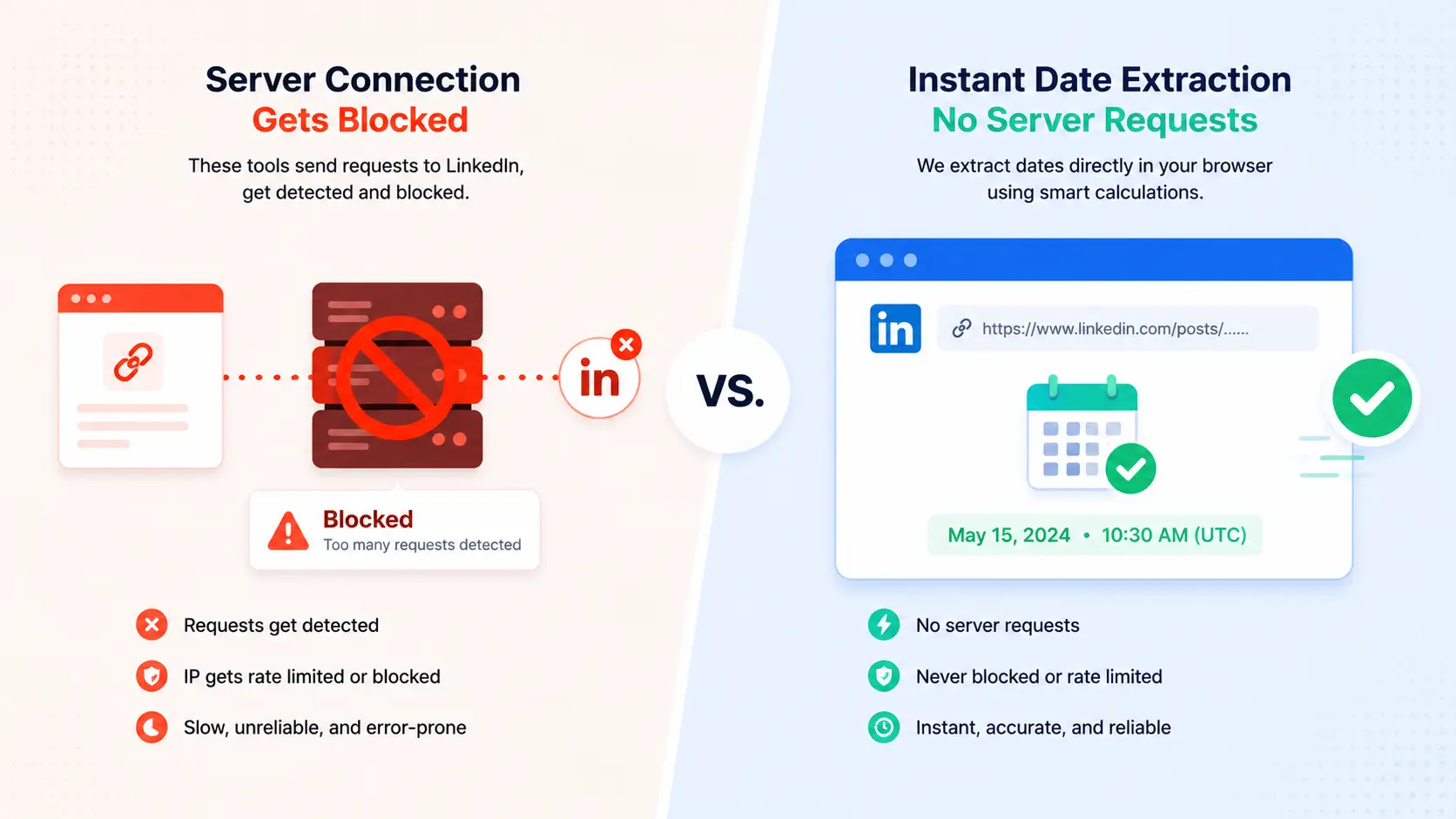
There are a few other “LinkedIn date checkers” out there. Most of them work by scraping LinkedIn’s website, meaning they send a request to LinkedIn, try to read the page, and pull the date from the HTML.
The problem? LinkedIn blocks most of those requests. So those tools break constantly. They show errors. They have daily limits. Some even ask for your LinkedIn login (please never give that to any tool).
Here’s how we compare:
| Feature | Our Tool | Other Tools |
|---|---|---|
| Speed | Instant (under 1ms) | 3-10 seconds |
| Accuracy | Millisecond precise | Depends on scraping |
| Gets blocked by LinkedIn | Never | Frequently |
| Daily limit | None | 10-50 requests typically |
| Requires login | No | Some do |
| Works offline | Yes (after page loads) | No |
| Data sent to servers | Nothing | Your URLs |
| Bulk support | Up to 50 at once | Rarely available |
| CSV export | Yes | Rarely |
Supported LinkedIn URL Formats!
Our tool works with all standard LinkedIn post URLs. Here are the formats we support:
Regular Post Links:
https://www.linkedin.com/posts/username_topic-activity-7312345678901234567-xxxx
Feed Update Links:
https://www.linkedin.com/feed/update/urn:li:activity:7312345678901234567
UGC Post Links:
https://www.linkedin.com/feed/update/urn:li:ugcPost:7312345678901234567
Share Links:
https://www.linkedin.com/feed/update/urn:li:share:7312345678901234567
Don’t worry if you don’t know which type your URL is. Just paste it in and our tool figures it out automatically.
Note: LinkedIn Pulse articles and newsletter URLs use a different format that doesn’t include a Snowflake ID. For those, check the published date shown directly on the article page.
Works on All Devices
Whether you’re on a laptop, tablet, or phone, this tool works perfectly.
- Desktop: Chrome, Firefox, Safari, Edge, all supported
- iPhone/iPad: Works in Safari and Chrome
- Android: Works in Chrome, Samsung Internet, and all major browsers
The design adjusts automatically to fit your screen. Buttons are easy to tap on mobile. And the bulk feature works just as smoothly on a phone as it does on a computer.
Try Our Other LinkedIn Tools
We’ve built a whole suite of free tools for LinkedIn users. Check them out:
- LinkedIn Video Downloader – Download any LinkedIn video in HD quality
- LinkedIn Image Downloader – Save photos and entire carousels from posts
- LinkedIn Character Counter – Count characters for LinkedIn’s 3,000-post limit
- LinkedIn Readability Checker – Check your post’s readability score before publishing
All of our tools are free, require no login, and are designed to make your LinkedIn experience better.
Why users keep coming back to this tool
Finding the exact date of a LinkedIn post shouldn’t be hard. But LinkedIn makes it unnecessarily difficult by only showing vague timestamps like “3w” or “1mo.”
Our LinkedIn Post Date Extractor fixes that problem in the simplest way possible. Paste a URL. Get the date. That’s it.
No accounts. No downloads. No limits. No tricks.
We built this tool because we needed it ourselves. And now it’s yours, completely free.
Give it a try. Paste a LinkedIn URL above and see the exact date in under a second. We think you’ll love it.