Linkedin Readability Checker
Analyze and improve your LinkedIn posts with our free readability checker and post optimizer. No login required.
LinkedIn Post Optimizer
Readability & Cutoff Checker
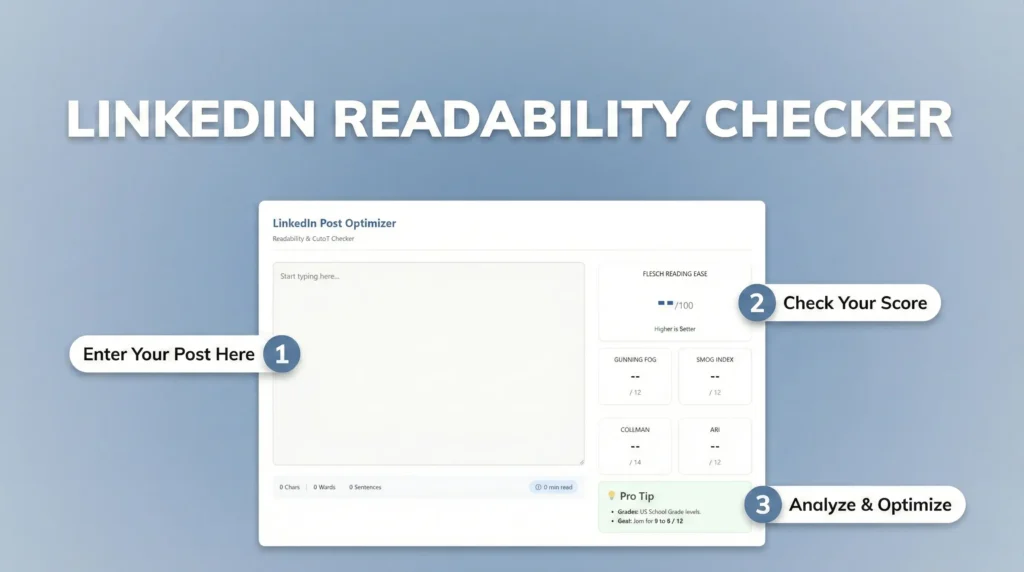
How to Use the Readability Checker?
Writing viral LinkedIn posts requires clarity and a strong hook. This tool helps you optimize your content in real-time.
This tool is designed to be easy for everyone:
- Start typing directly in the editor or paste your draft from another document.
- Our tool will instantly show realtime readability score, calculate your word count, character count, and estimated reading time.
- Review the score and clarity insights.
- Adjust your post if needed before publishing.
LinkedIn hides long intros behind a “See More” button. If the warning appears, shorten your first paragraph (under 150 characters) to ensure your hook stays visible on mobile.
We use industry-standard algorithms to grade your writing:
- Flesch Reading Ease: Aim for 60-80. Higher numbers mean your text is easier to read.
- Grade Levels (Gunning Fog, SMOG): These estimate the years of education needed to understand your text. Aim for Grade 6 to 8 for the widest audience reach.
- Keep sentences short: Try to keep sentences under 20 words.
- Use simple words: Avoid complex jargon (e.g., use “use” instead of “utilize”).
- Break it up: Use bullet points and line breaks to make your post scannable.
LinkedIn Readability Checker & Post Optimizer
Writing a good post on LinkedIn is not just about having a strong idea.
It is also about how easy that idea is to read.
Many LinkedIn posts fail not because the message is weak, but because the text feels heavy, unclear, or difficult to follow. Long sentences, complex words, and crowded paragraphs often cause readers to scroll past without engaging.
This LinkedIn Readability Checker & Post Optimizer helps you fix that.
What This Tool Does?
Our Linkedin Readability Checker & Post Optimizer analyzes your LinkedIn post and shows how easy it is for an average reader to understand. It checks sentence structure, word complexity, and overall flow, then gives you a clear readability score along with practical guidance.
The goal is simple:
help you write posts that people actually read and understand.
Instead of guessing whether your post is clear, you get a direct readability signal before publishing.
Why Readability Matters on LinkedIn?
LinkedIn users scroll fast.
They usually decide within the first few lines whether a post is worth their time.
Readers ignore even valuable ideas if your text feels complicated or tiring to read. Posts with better readability often feel more natural, more professional, and more approachable – which leads to higher engagement over time.
Readability does not change your message.
It simply removes friction between your thoughts and your audience.
Who Is This Tool For?
This tool is useful for:
- Professionals building a personal brand
- Content creators and writers
- Marketers and consultants
- Recruiters and hiring managers
- Anyone who posts on LinkedIn regularly
If clarity and engagement matter to you, readability should be part of your writing process.
If you need to save LinkedIn videos for learning or future reference, you can use our LinkedIn video downloader. Along with this, the platform also offers useful tools like a LinkedIn image downloader and a LinkedIn character counter to support everyday content needs.